Late last year, I stumbled across a small but important notice: Cloudflare plans to remove the proxy-dns command from cloudflared starting February 2, 2026. For most people, that might be a footnote. For my home network, it was a ticking clock.
I run two Pi-hole instances, each inside its own VM on separate physical hosts. Both Pi-holes rely on a local cloudflared instance running in proxy-dns mode to provide DNS‑over‑HTTPS (DoH) upstream resolution. It's a clean setup: Pi-hole handles filtering, cloudflared handles encrypted DNS, and everything hums along.
When I learned that proxy-dns was being deprecated, I started looking at alternatives.
A Drop‑In Replacement — Or Building My Own
The Pi-hole community's go‑to recommendation is dnscrypt-proxy. It's mature, widely used, and — importantly — it can act as an in‑place replacement for cloudflared's DoH functionality. I could have swapped it in with minimal effort.
But I saw an opportunity.
I'd been wanting to practice AI‑assisted systems coding on a real, self‑contained project. Replacing cloudflared's DoH mode felt like the perfect playground: small enough to build in a weekend, but real enough to run in production.
So instead of adopting dnscrypt‑proxy, I decided to build my own.
One weekend later, I had a working prototype:
https://github.com/whiskeyjay/homelab/tree/main/rust/doh-proxy
My goal was simple: a true drop‑in replacement. No Pi-hole changes. No port changes. No configuration rewrites. Just:
- stop cloudflared
- start my DoH proxy
- everything continues working
And that's exactly how it behaved.
Real‑World Testing
The proxy has been running in production since December, quietly handling all upstream DNS queries for both Pi-hole instances. To validate it, I ran Steve Gibson's DNS Benchmark against both Pi-holes.
The results were pleasantly uneventful:
- no measurable performance regression
- no errors in Pi-hole logs
- no behavioral differences compared to cloudflared
In other words: it behaved exactly like the component it replaced.
Telemetry: Better Than Expected
To validate the proxy's behavior further, I captured CPU and memory usage telemetry across both my DoH proxy (for Pi-hole instance 1, the primary instance) and the cloudflared (for Pi-hole instance 2, the backup instance) instances:
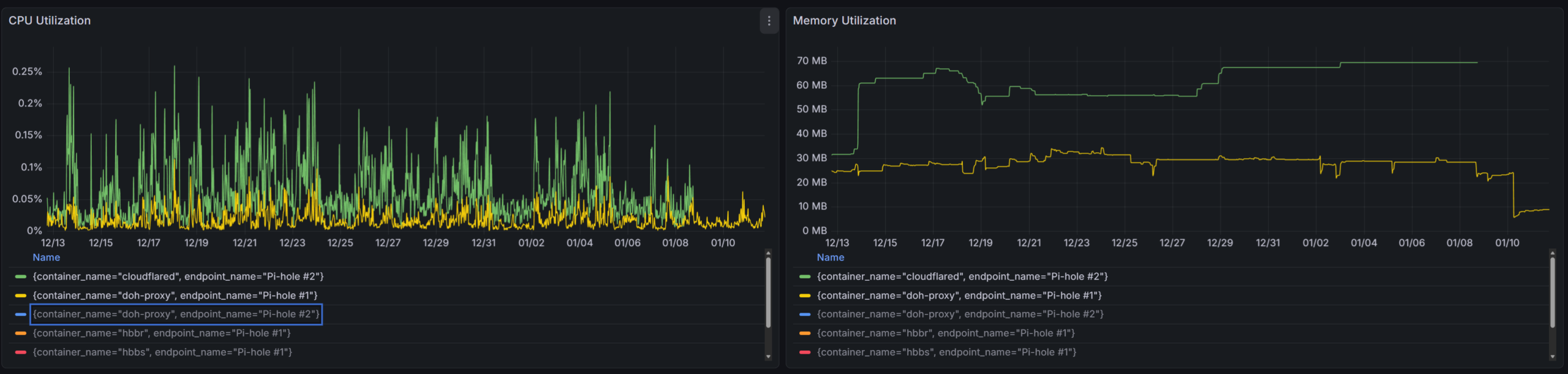
- The green line (cloudflared on Pi-hole #2) with a steady memory climb, reaching around 70 MB
- The yellow line (doh-proxy on Pi-hole #1) fluctuating between roughly 20–40 MB
- CPU usage for all containers remains low, but my proxy shows tighter bounds.
While I didn't benchmark throughput or latency directly, the resource profile looked clean and stable. Combined with the DNS Benchmark results and Pi-hole logs, this gave me confidence that the proxy was behaving as expected — no regressions, no errors, and no surprises.
Why Bother?
Ultimately, the motivation was straightforward: I wanted a real opportunity to practice AI‑assisted coding on a complete, end‑to‑end systems project. Building a DoH proxy from scratch gave me exactly that — a contained but meaningful challenge where I could design, implement, test, and deploy a network service that would actually run in production.
And through the process, I gained hands‑on experience with the full lifecycle of a DNS proxy: parsing DNS messages, handling DoH requests, managing concurrency, tuning performance, packaging the service, and integrating it cleanly into my existing Pi-hole setup.
What started as a weekend experiment turned into a tool that now quietly powers my home network. If you're running Pi-hole with cloudflared and want a future‑proof alternative — or just want to explore how a minimal DoH proxy works — feel free to take a look at the code, adapt it, or fork it for your own environment.